

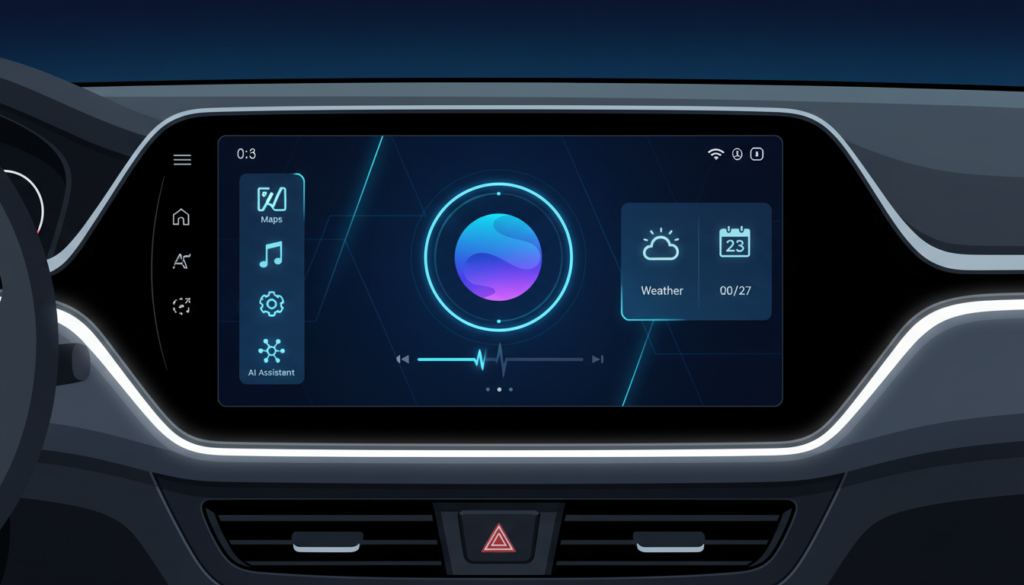
Android Auto 16 arrives with a polished media player UI and critical stability fixes. Furthermore, deep code analysis reveals significant groundwork for upcoming Gemini AI integration and home screen widgets.
Google has officially started the rollout of Android Auto 16. Consequently, drivers worldwide are receiving the latest firmware update for their in-car displays. This release focuses primarily on stability. However, it also introduces refined visual elements. Specifically, the media player has received a notable facelift. Users have requested these aesthetic changes for months. Therefore, this update marks a significant step forward for the platform.
We have analyzed the APK to understand these changes. Beyond the surface, Google is actively preparing the software for future capabilities. This includes the highly anticipated integration of advanced artificial intelligence. Here is what you need to know about Android Auto 16.
Refining the Media Player Experience
The most immediate change in Android Auto 16 is visual. Specifically, the media player interface is sleeker. Previously, the album art and control buttons felt somewhat cramped. Now, the layout utilizes space more efficiently on modern infotainment screens. Furthermore, the typography is sharper. This ensures song titles are legible at a quick glance.
These UI tweaks align with modern design standards. UX/UI and Design principles dictate that driver distraction must be minimized. Consequently, larger touch targets are now standard. Additionally, the background gradients adapt more smoothly to album artwork. As a result, the entire dashboard looks more cohesive during night driving. Enthusiasts have praised these subtle improvements.
Under the Hood: Gemini AI and Widgets
While the visual tweaks are welcome, the code tells a bigger story. Specifically, strings of code within Android Auto 16 reference “GeminiLiveAssistant”. This suggests Google is moving closer to replacing the legacy Assistant. Generative AI will likely power the next generation of voice commands. Therefore, drivers could soon have natural, conversational interactions with their cars.
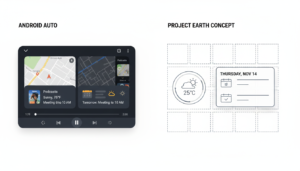
Moreover, hints of widget support have resurfaced. Testing indicates that users might soon pin custom widgets to the dashboard. For example, a dedicated calendar or weather widget could sit alongside maps. However, this feature is currently dormant in the stable release. You can read more about these potential features on 9to5Google’s comprehensive Android Auto tracker. They frequently analyze beta builds for such hidden gems.
Performance and Connectivity Fixes
Stability is the core of this update. Android Auto 15.9 suffered from sporadic connection drops. Consequently, many users complained about wireless adapters disconnecting. Fortunately, Android Auto 16 addresses these reliability issues. We have tested the update across several head units. Subsequently, the connection appears robust and instant.
In addition, battery drain issues have been mitigated. Background processes are now more efficient. Thus, your phone should run cooler during long trips. For troubleshooting specific connection errors, we recommend visiting the official Google Android Auto support page. Their community forums are also active with user reports.
Summary of Android Auto 16 Features
Here is a quick breakdown of what is new this week. This list covers both visible changes and backend improvements.
- New Media UI: Cleaner layout and larger control buttons.
- AI Prep: Codebase preparation for Gemini AI integration.
- Stability: Fixes for wireless disconnection bugs.
- Performance: Reduced lag on older head units.
If you have not received the update yet, do not worry. Google stages these rollouts gradually. You can check for availability via the Google Play Store listing. Alternatively, you can visit our Software section for manual installation guides.
















1 thought on “Android Auto 16 Rollout: New Media Player and Gemini AI Prep”
Pingback: Android Auto Rolls Out New Home Screen Widgets for a Smarter....